


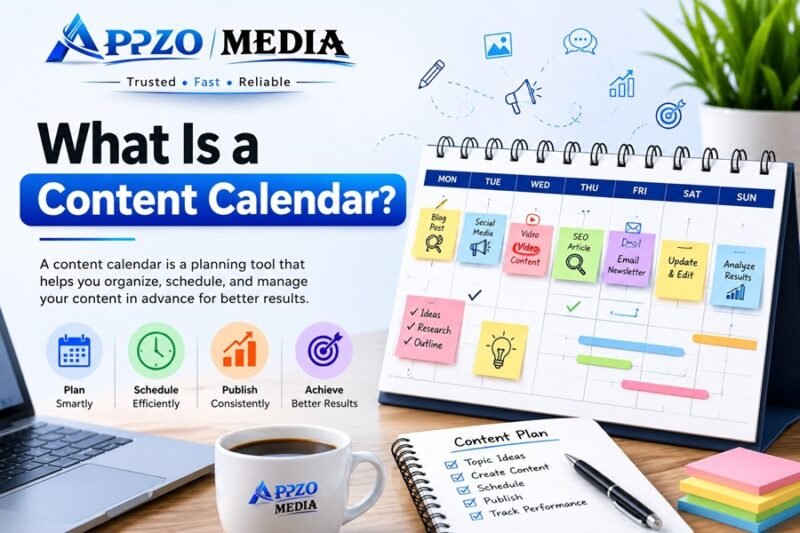
A content calendar is a planning tool — usually a spreadsheet, document, or app — that shows what content you’ll publish, when, and on which platform. It helps writers, marketers, and businesses stay organized, hit deadlines, and post consistently instead of scrambling for ideas at the last minute.
If you’ve ever forgotten to post on social media for a week, published two blog posts on the same topic by mistake, or missed a product launch date — a content calendar fixes all of that.
This guide covers everything: what a content calendar is, why it matters, how to build one step by step, free templates you can copy today, real examples, the best tools in 2026, and mistakes to avoid.
What Is a Content Calendar?
A content calendar is a visual schedule that maps out your content — blog posts, social media updates, emails, videos — across days, weeks, or months.
Think of it like a school timetable, but instead of classes, it lists:
- What content you’re creating
- Who’s creating it
- When it goes live
- Where it’s published
- What stage it’s in (idea, draft, review, published)
Most content calendars live in tools like Google Sheets, Notion, Excel, or dedicated project management apps like Trello, Asana, or ClickUp.
A content calendar is not the same as writing the actual content. It’s the planning layer that sits above your content — it tells you what to write, not how to write it.
Why Is a Content Calendar Important?
Without a plan, content creation becomes reactive. You post when you remember, write about whatever comes to mind, and often duplicate effort.
A content calendar solves three core problems:
- Consistency — Search engines and social algorithms reward regular publishing. Random, inconsistent posting hurts visibility.
- Organization — Teams know exactly who’s responsible for what, avoiding confusion and missed deadlines.
- Strategy — Instead of random topics, you can plan content around keywords, seasons, product launches, and audience needs.
For SEO specifically, a content calendar lets you plan topics around keyword research and search intent, rather than guessing what to write next.
Benefits of Using a Content Calendar
- Saves time — no more last-minute topic brainstorming
- Improves consistency — regular publishing builds audience trust
- Reduces content gaps and duplication — you can see everything in one place
- Aligns teams — writers, designers, and marketers stay on the same page
- Supports SEO growth — content is planned around real search demand
- Helps with seasonal planning — festivals, sales, product launches
- Makes reporting easier — you can track what worked and what didn’t
- Reduces stress — planning ahead means fewer fire drills
Content Calendar vs Editorial Calendar
People often use these terms interchangeably, but there’s a subtle difference.
| Feature | Content Calendar | Editorial Calendar |
|---|---|---|
| Scope | All content types (blog, social, email, video) | Primarily written/editorial content (blog, articles) |
| Focus | Scheduling and publishing dates | Editorial process — topics, angles, approvals |
| Used by | Marketing teams, social media managers, businesses | Publishers, editors, content teams |
| Detail level | Broad — dates, platforms, status | Deep — topic research, sourcing, fact-checking, editing stages |
| Best for | Multi-channel marketing planning | Newsrooms, blogs, magazines |
In practice, small businesses and marketers usually just need one combined content calendar that covers both scheduling and editorial planning.
Types of Content Calendars
Different teams need different calendars depending on the channel.
Blog Content Calendar
Tracks blog topics, target keywords, authors, due dates, and publish dates. Usually tied to an SEO content strategy.
SEO Content Calendar
Focuses on keyword-driven planning — mapping keywords from tools like Semrush or Ahrefs to content topics, tracking search intent, and monitoring rankings via Google Search Console.
Social Media Content Calendar
Plans posts across Instagram, Facebook, LinkedIn, X, and other platforms. Often managed with tools like Buffer, Hootsuite, or Meta Business Suite.
Email Marketing Calendar
Schedules newsletters, promotional emails, and drip campaigns tied to launches or seasonal offers.
Video Content Calendar
Plans video topics, filming dates, editing deadlines, and publish dates — commonly used by YouTube creators.
What Should Every Content Calendar Include?
A good content calendar isn’t just a list of dates. Here’s what it should track:
| Element | Purpose |
|---|---|
| Publish date | When the content goes live |
| Content title/topic | What the piece is about |
| Content type | Blog, video, social post, email, etc. |
| Target keyword | Primary SEO keyword (for blog/SEO content) |
| Platform/channel | Website, Instagram, YouTube, email, etc. |
| Author/creator | Who is responsible for creating it |
| Status | Idea, drafting, in review, scheduled, published |
| Due date | Internal deadline before the publish date |
| CTA/goal | What action you want the reader to take |
| Notes/links | Reference links, briefs, or assets |
How to Create a Content Calendar
Here’s a practical, step-by-step process you can follow today.
Step 1: Define Your Goals
Decide what you want your content to achieve — traffic, leads, brand awareness, sales, or engagement. Your goal shapes what topics you plan.
Step 2: Choose Your Platform
Pick a tool based on your team size and workflow. Solo creators often prefer Google Sheets or Notion. Teams may prefer Trello, Asana, or ClickUp.
Step 3: Do Keyword and Topic Research
For blogs and SEO content, use tools like Semrush or Ahrefs to find keywords with real search demand. For social media, check trending topics and audience interests.
Step 4: Set a Publishing Frequency
Decide realistically how often you can publish — daily, 3x a week, weekly. Consistency matters more than volume.
Step 5: Map Out Topics on a Timeline
Assign topics to specific dates. Group similar topics together and space out related content to avoid overlap.
Step 6: Assign Ownership
If you work with a team, assign a writer, designer, and editor to each piece of content.
Step 7: Add a Status Column
Track each content piece through stages: Idea → Draft → Review → Scheduled → Published.
Step 8: Review and Adjust Weekly
Check performance data from Google Analytics and Google Search Console, and adjust upcoming topics based on what’s working.
Free Content Calendar Template
Copy this table structure directly into Google Sheets or Excel.
Monthly Content Calendar
| Date | Content Title | Type | Keyword | Platform | Status | Owner |
|---|---|---|---|---|---|---|
| July 1 | “10 Content Calendar Mistakes” | Blog | content calendar mistakes | Website | Published | Writer A |
| July 3 | Instagram Reel — Behind the Scenes | Social | — | Scheduled | Social Manager | |
| July 5 | Newsletter — July Roundup | — | Draft | Writer B | ||
| July 8 | “Best SEO Tools 2026” | Blog | best seo tools | Website | In Review | Writer A |
| July 10 | Product Launch Teaser | Social | — | Instagram, X | Idea | Social Manager |
Weekly Content Calendar
| Day | Content | Platform | Status |
|---|---|---|---|
| Monday | Blog post publish | Website | Scheduled |
| Tuesday | Instagram carousel | Draft | |
| Wednesday | Email newsletter | Idea | |
| Thursday | LinkedIn article | Draft | |
| Friday | YouTube short | YouTube | Scheduled |
| Saturday | Community post | Idea | |
| Sunday | Weekly recap story | Idea |
Content Status Workflow
| Stage | Meaning |
|---|---|
| Idea | Topic identified, not yet started |
| Drafting | Writer is working on it |
| In Review | Editor/manager is checking it |
| Scheduled | Approved and queued for publishing |
| Published | Live on the platform |
Content Calendar Examples
Blog Example
A finance blog plans one SEO-focused post per week (e.g., “How to Save Tax in 2026”), alternating with one evergreen how-to guide, tracked by keyword and target word count.
Agency Example
A digital marketing agency manages calendars for multiple clients using Asana or ClickUp, with separate boards per client and shared visibility for approvals.
Ecommerce Example
An online store maps content around sales events — pre-launch teasers, launch day posts, and post-sale follow-up emails — all tied to a product calendar.
YouTube Example
A creator plans video topics a month ahead, tracking filming dates, editing deadlines, thumbnail design (via Canva), and publish dates.
Instagram Example
A lifestyle brand uses a monthly grid plan in Notion, mixing reels, carousels, and stories, scheduled through Buffer.
Small Business Example
A local bakery plans weekly posts around new products, customer reviews, and festive offers, using a simple Google Sheets calendar.
Best Content Calendar Tools
| Tool | Best For | Free Plan | Collaboration | Learning Curve |
|---|---|---|---|---|
| Google Sheets | Simplicity, full customization | Yes | Good | Low |
| Microsoft Excel | Offline work, formulas | Limited | Moderate | Low |
| Notion | All-in-one workspace, databases | Yes | Good | Medium |
| Trello | Visual, card-based planning | Yes | Good | Low |
| ClickUp | Advanced project management | Yes | Excellent | Medium-High |
| Asana | Team task tracking | Yes | Excellent | Medium |
| Airtable | Database-style content planning | Yes | Good | Medium |
Free vs Paid Tools
| Category | Free Option | Paid Option | When to Upgrade |
|---|---|---|---|
| Spreadsheets | Google Sheets | Excel Microsoft 365 | Need offline access, advanced formulas |
| Project Management | Trello (basic) | ClickUp/Asana Premium | Large team, multiple clients |
| All-in-One | Notion (personal) | Notion Team plan | Need shared workspace, permissions |
| Social Scheduling | Buffer (limited posts) | Hootsuite/Buffer Pro | Managing multiple accounts |
SEO Content Calendar Workflow
Here’s how keyword research turns into a published, ranking article:
- Research keywords using Semrush or Ahrefs to find search volume and difficulty
- Check search intent — informational, transactional, or navigational
- Group keywords by topic clusters rather than planning one keyword at a time
- Add topics to your calendar with target keyword, word count, and due date
- Write and optimize the content around the keyword and search intent
- Publish on WordPress or your CMS of choice
- Track performance using Google Search Console and Google Analytics
- Update older content based on ranking data — this is often skipped but highly effective
Social Media Content Calendar Workflow
- Identify platforms where your audience is most active
- Plan a content mix — educational, promotional, entertaining, behind-the-scenes
- Batch-create graphics using Canva
- Schedule posts using Buffer, Hootsuite, or Meta Business Suite
- Engage with comments and DMs after publishing
- Review analytics weekly and adjust the content mix based on engagement
How AI Can Help Build a Content Calendar
Tools like ChatGPT and Claude can speed up the planning process — but they work best as assistants, not replacements for human judgment.
AI can help you:
- Brainstorm topic ideas based on a niche or keyword
- Draft outlines for blog posts or social captions
- Suggest content categories or themes for a month
- Summarize competitor content for gap analysis
What AI can’t do well:
- Understand your brand voice as deeply as you do
- Know real-time trends or breaking news without live data
- Make final editorial decisions about what your audience actually wants
The best approach: use AI to speed up brainstorming and drafting, then apply your own experience and judgment to finalize the calendar.
Common Mistakes
- Planning too far ahead without flexibility — trends and news change fast
- Ignoring keyword research — publishing content nobody searches for
- Ignoring performance data — not checking what’s actually working
- Ignoring content status tracking — losing track of what’s done vs pending
- Overloading the calendar — planning more content than you can realistically produce
- No clear ownership — nobody knows who’s responsible for what
- Copying competitors blindly — instead of finding your own content gaps
- Not leaving room for trending topics — a rigid calendar misses timely opportunities
- Forgetting to update old content — treating publishing as “one and done”
- Not aligning content with business goals — creating content with no clear purpose
- Using too many tools at once — causing confusion instead of clarity
- Skipping the review/approval stage — leading to errors going live
Expert Tips
- Batch your content creation — write multiple posts in one sitting
- Repurpose one piece of content across multiple platforms
- Always tie topics back to a target keyword or business goal
- Keep a “content idea bank” separate from your active calendar
- Color-code content types for quick visual scanning
- Review your calendar every Friday for the week ahead
- Leave 10-15% of your calendar flexible for trending topics
- Track competitor publishing frequency for benchmarking
- Use templates to speed up recurring content types
- Set internal deadlines a few days before the actual publish date
- Align social posts with blog publish dates for cross-promotion
- Archive published content in the same sheet for easy reference
- Involve your team in monthly planning sessions
- Use UTM links to track which content drives real traffic
- Don’t chase perfection — a published, decent post beats a perfect, unpublished one
Final Checklist
Use this before finalizing your content calendar:
- Goals defined (traffic, leads, engagement, sales)
- Tool selected (Sheets, Notion, Trello, etc.)
- Keyword research completed for blog/SEO content
- Publishing frequency set and realistic
- Topics mapped to dates
- Ownership assigned per content piece
- Status tracking column added
- Platform/channel noted for each item
- CTA or goal defined per piece
- Weekly review scheduled
FAQs
1. What is a content calendar in simple words? A content calendar is a schedule that shows what content you’ll publish, when, and where — helping you stay organized and consistent.
2. Is a content calendar the same as a social media calendar? Not exactly. A social media calendar is one type of content calendar, focused only on social posts. A full content calendar can include blogs, emails, and videos too.
3. What tools are best for beginners? Google Sheets and Notion are the easiest starting points because they’re free and simple to set up.
4. How far in advance should I plan content? Most creators plan one month ahead, keeping some flexibility for trending topics.
5. Do I need a content calendar if I’m a solo blogger? Yes. Even solo creators benefit from consistency and organization, which a calendar provides.
6. Can I use Excel instead of Google Sheets? Yes, both work well. Google Sheets is better for real-time collaboration; Excel is preferred for offline work.
7. How do I plan an SEO content calendar? Start with keyword research using tools like Semrush or Ahrefs, group keywords by topic, then map them to publish dates based on priority and search volume.
8. What’s the difference between a content calendar and a posting schedule? A posting schedule just shows when content goes live. A content calendar includes the full planning process — topics, keywords, status, and ownership.
9. Can AI tools create a content calendar for me? AI can help brainstorm topics and draft outlines, but you should review and finalize the calendar based on your own strategy and audience knowledge.
10. How often should I update my content calendar? Review it weekly, and do a deeper strategy review monthly based on performance data.
11. What metrics should I track alongside my content calendar?
| KPI | What It Measures |
|---|---|
| Organic traffic | How much search traffic your content drives |
| Engagement rate | Likes, comments, shares on social content |
| Click-through rate | How many people click your content in search/social |
| Conversion rate | How many readers take the desired action |
| Publishing consistency | How often you actually stick to the plan |
This guide gives you everything needed to build a working content calendar from scratch — no more guesswork, missed deadlines, or random posting.