


Using multiple tools for notes, tasks, documentation, and collaboration slows teams down. That’s why many businesses rely on Notion to manage everything in one place.
This guide shows exactly how to use Notion for business, even if you’re starting from scratch.
Why Businesses Use Notion
Notion helps businesses:
Centralize information
Manage projects and tasks
Build internal documentation
Improve team collaboration
Reduce dependency on multiple tools
For startups and small teams, it often replaces Google Docs, Trello, internal wikis, and simple CRMs.
Step 1: Set Up Your Business Workspace
After signing up, create a dedicated business workspace.
Best Practices
Use your business name as the workspace name
Invite team members with correct permissions
Create a clean sidebar structure from day one
Recommended top-level pages:
Dashboard
Projects
Tasks
Team Wiki
Clients / CRM
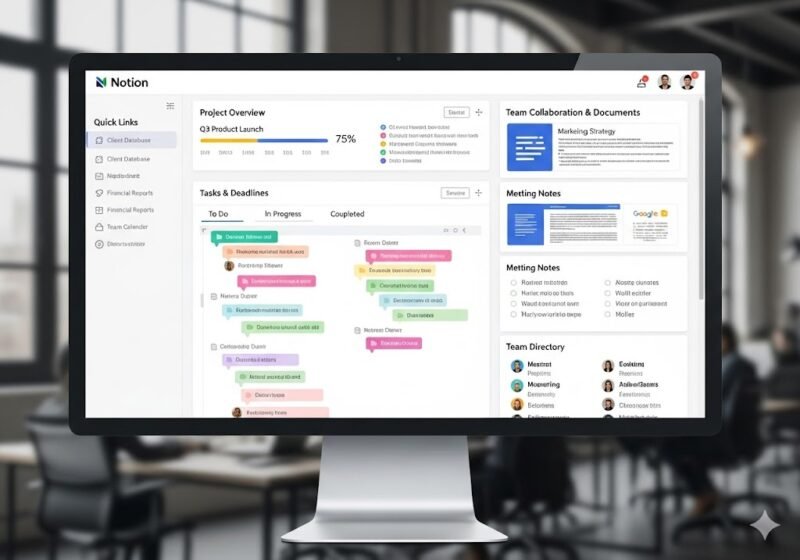
Step 2: Create a Business Dashboard (Most Important)

Your dashboard is the control center of your business.
What to include:
Active projects
Today’s tasks
Team priorities
Quick links to important pages
Use:
Linked databases
Kanban boards
Callout blocks for announcements
A good dashboard saves hours every week.
Step 3: Manage Projects & Tasks in Notion
Instead of separate task tools, use Notion databases.
How to structure a project database:
Task name
Status (To-Do, In Progress, Done)
Owner
Deadline
Priority
Views to create:
Board (Kanban) → daily work
Calendar → deadlines
Table → full overview
This setup works well for marketing, operations, and product teams.
Step 4: Build an Internal Team Wiki
Every business needs documentation.
Use Notion to store:
SOPs
Company policies
Onboarding guides
Meeting notes
Structure tips:
One main “Team Wiki” page
Sub-pages for departments
Clear headings and toggles
This reduces repeated questions and training time.
Step 5: Use Notion for Client & CRM Tracking
Notion can act as a lightweight CRM.
CRM database example:
Client name
Contact details
Deal status
Notes
Follow-up dates
This is ideal for:
Freelancers
Agencies
Small service businesses
Step 6: Collaboration & Permissions

Notion allows:
Page-level permissions
Team comments
Mentions (@team member)
Best practice:
Limit editing access
Give view-only access where needed
Keep sensitive data restricted
For growing teams, this is where Notion Business plan becomes useful.
Step 7: Use Templates to Save Time
Notion provides ready-made templates for:
Project management
Business dashboards
Meeting notes
Content calendars
You can also duplicate templates and customize them for your workflow.
Step 8: Automations & Integrations
To scale operations:
Connect Notion with Slack, Google Drive, and automation tools
Use automations for recurring tasks
Sync updates across platforms
This turns Notion into a business operating system.
Common Mistakes Businesses Make with Notion
❌ Overcomplicating databases
❌ Creating too many pages
❌ No clear structure
❌ Not training team members
Start simple, then expand gradually.
Is Notion Good for Business?
Yes—if used correctly.
Notion works best for:
Startups
Remote teams
Content & marketing teams
Small to mid-size businesses
Large enterprises may need advanced controls, but for most teams, Notion delivers excellent value.
Final Verdict
Notion is not just a note-taking app—it’s a flexible business workspace. When set up properly, it can replace multiple tools, improve collaboration, and keep your entire operation organized.
👉 Next recommended read: