

Quick Answer: How do you check if a loan app is genuine?
Find the bank or NBFC lending the money, then confirm that lender has listed the exact app in RBI’s Digital Lending Apps directory (rbi.org.in, Citizen’s Corner). The RBI does not approve apps itself. Genuine apps never need your contacts or gallery, and loan money moves only between your account and the lender’s.
Sources: RBI press release on the DLA directory, RBI (Digital Lending) Directions 2025, Google Play policy.
How to check if a loan app is genuine is a question most people ask only after something has gone wrong: a loan of ₹10,000 that arrives as ₹6,500, a repayment demand within a week, or messages to everyone in their contact list. The good news is that since July 2025, India has had an official way to check an app before you borrow. This APZO Media guide shows how to use it in five minutes, why the phrase “RBI approved loan app” misleads people, and what to do if you have already been trapped.
First, a Myth: There Is No Such Thing as an “RBI Approved Loan App”
Search for loan apps and you will find dozens of lists titled “RBI approved loan apps”. The phrase is misleading. The RBI does not license or approve individual apps. It regulates the bank or NBFC (non-banking financial company) that actually lends the money, and that lender is responsible for the apps it uses.
This matters because a fake app can copy a real NBFC’s name, put “RBI registered” on its screen, and look completely official. The real test is not what the app says about itself. It is whether a regulated lender has officially declared that app to the RBI.
The RBI Digital Lending Apps Directory, Explained
The RBI (Digital Lending) Directions, 2025, issued on May 8, 2025, require every regulated lender to report the digital lending apps it deploys. Lenders upload these details on RBI’s CIMS portal, and the RBI publishes them as a public list. The RBI said the list would be available on its website under Home, then Citizen’s Corner, then “DLAs deployed by Regulated Entities”, on or before July 1, 2025.
Two details from the RBI’s own announcement are important, and most articles skip them:
- The list is based on data submitted by lenders “on as is basis, without any further validation check by the Reserve Bank.”
- It is published “for the limited purpose of aiding the customers in verifying the claim of a DLA’s association with a RE.”
In plain terms: if an app is in the directory, a regulated lender has publicly claimed it. That is a strong sign, but it is not a guarantee that every practice of the app is fine. If an app is not in the directory, no regulated lender has vouched for it, and that is a reason to walk away.
The directory now also acts as a gate for the Play Store. Google’s policy for India says personal loan apps must be on the RBI’s list before they can be published, all new personal loan apps had to comply from October 30, 2025, and apps already on Google Play in India had to appear on the list by January 28, 2026 to stay available.
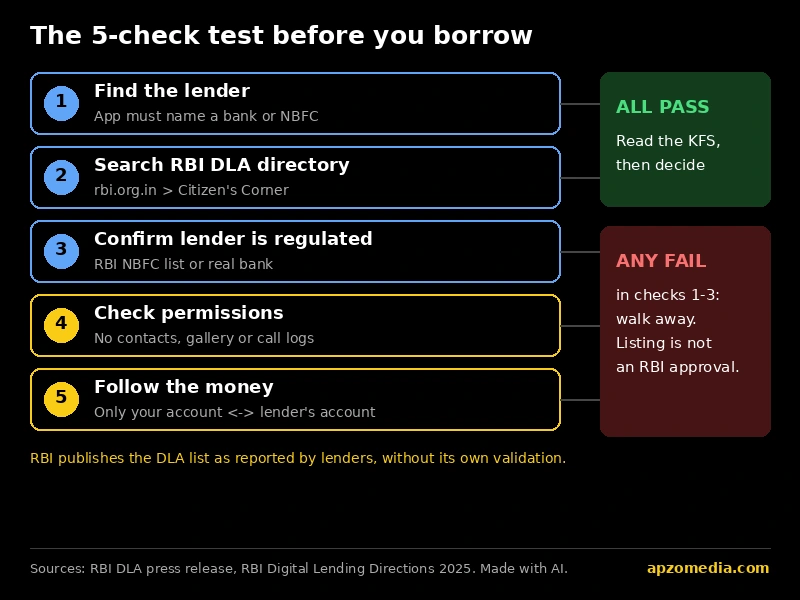
RBI DLA directory check flow for how to check if a loan app is genuine
How to Check if a Loan App Is Genuine: The 5-Check Method
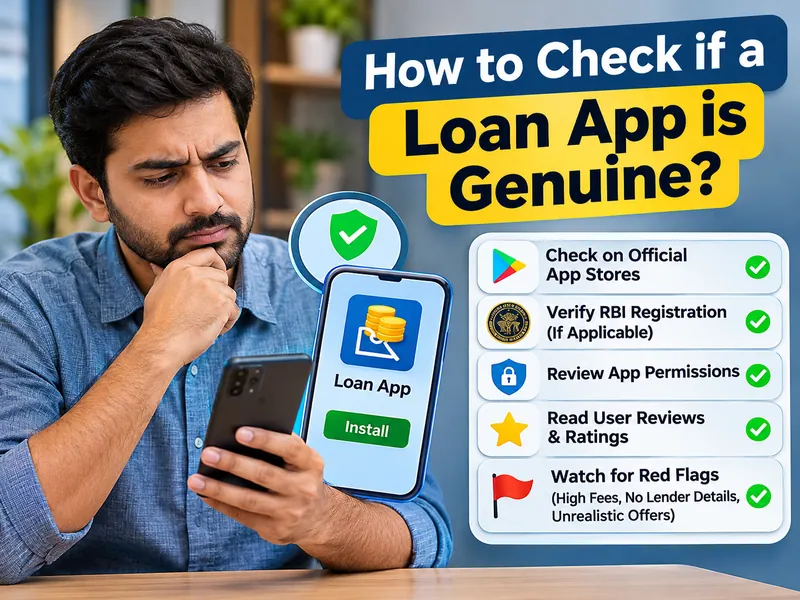
Run these checks in order. If an app fails any of the first three, stop.
Check 1: Find the real lender’s name
Open the app’s “About”, “Partners” or “Lending Partners” page, its website and its privacy policy. A genuine app names the specific bank or NBFC that will lend you the money. Under the 2025 Directions, lenders must also give you a Key Fact Statement (KFS) before you sign, covering the loan terms, charges and repayment obligations. If the app only shows its own brand name and vague claims like “RBI partner”, that is your first red flag.
Check 2: Find the app in RBI’s DLA directory
Go to rbi.org.in, open Citizen’s Corner, and select “DLAs deployed by Regulated Entities”. Search for the lender’s name from Check 1, then confirm the exact app name appears under that lender. Watch spelling carefully. Business Standard has warned that fraudulent apps often use names that closely resemble legitimate ones.
Check 3: Confirm the lender itself is regulated
If the lender is an NBFC, check it against the RBI’s list of registered NBFCs on rbi.org.in. If it is a bank, confirm it is a real bank with its own website and grievance contacts. An app listed under a lender that does not exist is a fake listing.
Check 4: Watch which phone permissions it asks for
RBI’s 2025 Directions bar digital lending apps from accessing personal phone resources like your contacts or call logs. Google Play’s policy for personal loan apps has also prohibited access to sensitive data such as photos, videos, contacts, precise location and call logs. An app that refuses to work until you grant contacts or gallery access is behaving like a recovery-harassment app, not a regulated lender.
Check 5: Follow the money
Under the Directions, loan disbursals and repayments must flow directly between your bank account and the regulated lender’s account. So:
- The loan should arrive from the lender’s account, not from a random individual.
- Repayment should go to the lender’s official account or payment link, never to someone’s personal UPI ID.
- Any “processing fee” demanded before the loan is disbursed, especially to a personal account, is a classic scam pattern.
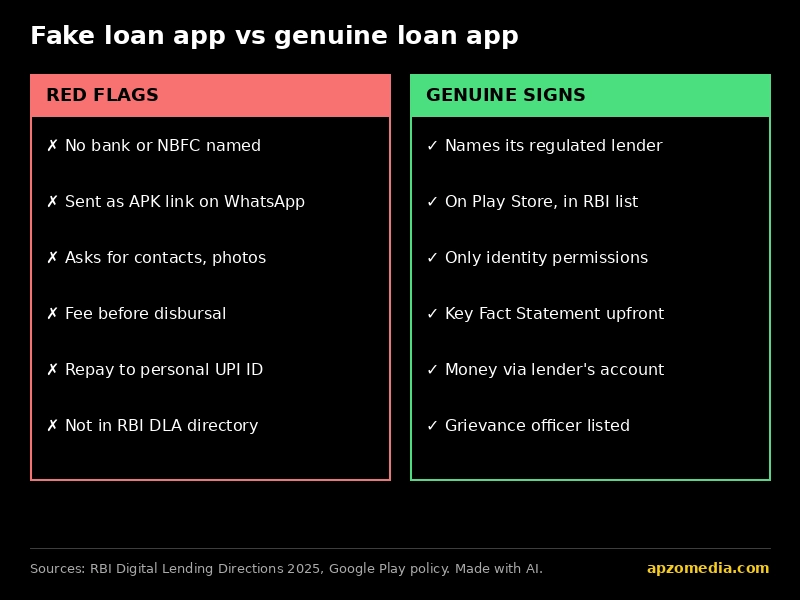
Fake loan app red flags compared with genuine loan app signs
A Real-World Walkthrough: The WhatsApp “Instant Loan” Link
Here is how the five checks play out on a common scenario. This is an illustrative example built from the patterns above, not a specific app.
You receive a WhatsApp message: “Pre-approved ₹50,000 loan, no CIBIL check, money in 10 minutes. Download now,” with a link to an APK file.
- Check 1 fails immediately. The message names no bank or NBFC.
- The download link is itself a warning. Because Google Play now requires personal loan apps in India to be on RBI’s list, an app pushed as a direct APK download is often trying to avoid that gate.
- Check 4 would fail at install. These apps typically ask for contacts, photos and storage before showing any loan offer.
- Check 5 is where the damage happens. A “processing fee” is requested to a personal UPI ID, or a smaller amount is deposited and a much larger repayment is demanded within days.
Compare that with a genuine flow: the app is downloaded from the Play Store, names its NBFC partner, appears under that NBFC in RBI’s directory, shows a KFS with the full cost before you accept, and asks only for the permissions needed to verify your identity.
How Big Is the Problem?
The numbers explain why the directory exists. The government told Parliament that between April 2021 and July 2022, Google reviewed roughly 3,500 to 4,000 loan apps and suspended or removed over 2,500 of them from the Play Store. In a later reply, it said over 2,200 more were removed between September 2022 and August 2023. Business Today reported in December 2025 that the government had blocked 87 illegal loan apps after complaints of harassment, fraud and data misuse.
Already Borrowed From a Suspicious App? Do This
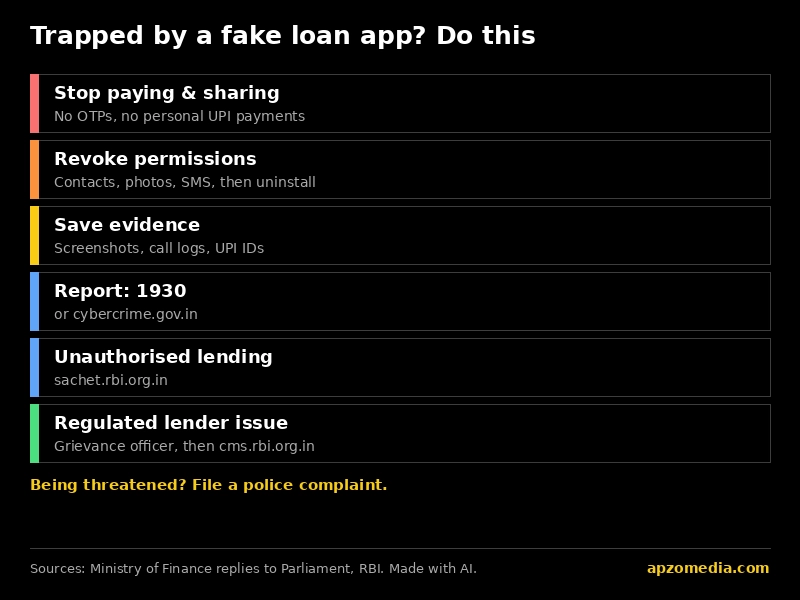
What to do after borrowing from a fake loan app
- Stop sharing anything. No more OTPs, documents or payments to personal UPI IDs.
- Revoke permissions. In your phone settings, remove the app’s access to contacts, photos, storage and SMS, then uninstall it.
- Save the evidence. Screenshots of the app, messages, call logs, payment receipts and UPI IDs.
- Report it. Use the National Cybercrime Reporting Portal (cybercrime.gov.in) or call 1930. The government’s reply to Parliament also lists SACHET (sachet.rbi.org.in) as a route for complaints about unauthorised lending.
- If the lender is a regulated bank or NBFC, complain to its grievance officer first, then escalate to the RBI’s complaint portal at cms.rbi.org.in.
- Warn your contacts that they may receive messages, and that they should not pay or respond.
- If you are being harassed or threatened, file a police complaint. You do not have to deal with recovery threats alone.
Borrowing Safely Next Time
A genuine digital loan is still a loan. Before you accept any offer, read the KFS, compare the total cost with at least one bank or established NBFC, and borrow only what you can repay from your regular income. If you are exploring quick personal loans, our guide on getting an instant personal loan in Bangalore with Aadhaar and PAN covers what lenders typically check. Whatever you choose, run the five checks above first.
Frequently Asked Questions
Does the RBI approve loan apps? No. The RBI regulates banks and NBFCs, not individual apps. A genuine loan app is one that a regulated lender has officially declared to the RBI, which you can verify in the DLA directory on rbi.org.in.
Where is the RBI loan app list? On rbi.org.in, under Citizen’s Corner, in the section “DLAs deployed by Regulated Entities”. It has been available since July 1, 2025.
If an app is in the RBI directory, is it 100% safe? Not automatically. The RBI publishes the list as submitted by lenders, without its own validation, only to help you verify an app’s link to a regulated lender. Still read the Key Fact Statement and check permissions and payment flows.
Can a loan app access my contacts and photos? RBI’s 2025 Directions bar digital lending apps from accessing phone resources such as contacts or call logs, and Google Play’s loan app policy blocks access to photos, contacts and call logs. An app that insists on this access is a red flag.
Is a loan app downloaded from a link outside the Play Store safe? Treat it with extreme caution. Google Play requires personal loan apps in India to be on RBI’s list, so an app pushed through a direct download link may be avoiding that check.
Where can I complain about a fake loan app? Report it on cybercrime.gov.in or call 1930. You can also use the RBI’s SACHET portal for unauthorised lending, and the RBI complaint portal (cms.rbi.org.in) for complaints against regulated banks and NBFCs.
Check First, Borrow Second
Five minutes of checking can save you months of harassment. Find the lender, find the app in RBI’s directory, confirm the lender is regulated, refuse unnecessary permissions, and make sure money moves only between you and the lender. If any step fails, the safest loan is the one you do not take. For more practical money guides, explore APZO Media’s finance coverage.
Disclaimer
This article is for general information only and is not financial or legal advice. APZO Media does not recommend or endorse any lending app or lender. Regulations and platform policies can change, so verify current details on the RBI website before borrowing. If you are facing harassment or fraud, contact the cybercrime helpline (1930) or your local police.
Last updated: 28 November 2026