




The best task management tools for small teams are the ones your whole team actually opens every day, not the ones with the longest feature list. At Apzo Media, we tested a mix of free and paid tools across our own content and marketing workflows, and this guide covers what actually held up.
What Makes a Task Management Tool Actually Good for Small Teams?
A good task management tool lets your team see who’s doing what, by when, without a training session first. If it takes more than a day to get everyone comfortable using it, it’s already working against you.
Small teams don’t need enterprise-grade complexity. What actually matters:
- Fast task creation – adding a task should take seconds, not a form with 12 fields
- Clear ownership – one glance tells you who owns what
- Flexible views – some people think in lists, others in boards, the tool should support both
- Low setup time – you should be running real tasks within an hour, not a week
- Honest free tier – free plans that don’t quietly cap you out at 10 tasks
Teams that plan and track work in one shared place are roughly 2.4 times more likely to stay focused on what actually matters, according to Atlassian’s State of Teams research. That’s the whole point of using one of these tools instead of scattered spreadsheets and chat threads.
Best Task Management Tools for Teams (Overall Picks)
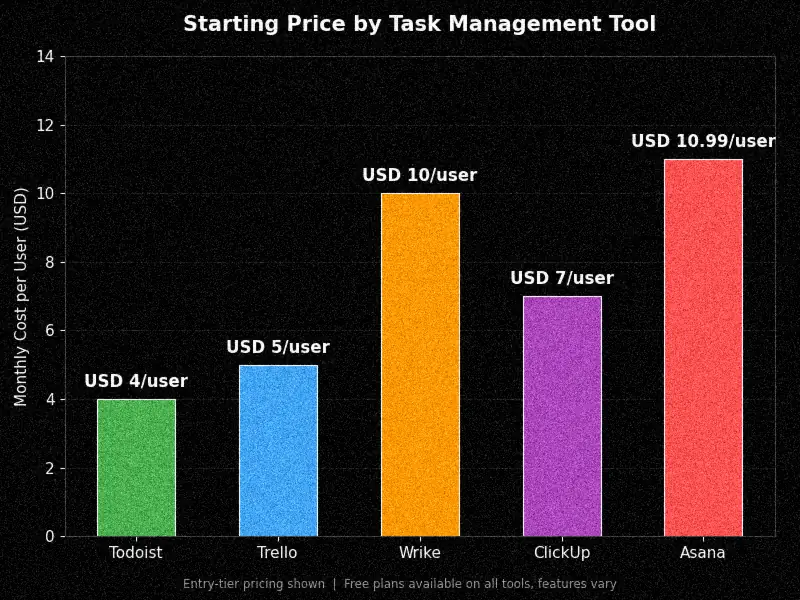
For most small teams, the right pick comes down to three types: simple list-based tools, visual kanban tools, and tools built for cross-functional work with dependencies.
| Tool | Best For | Starting Price | Standout Feature |
|---|---|---|---|
| Todoist | Simple task lists, small teams | Free / $4 per user/month | Fast task capture, clean mobile app |
| Trello | Visual, kanban-style teams | Free / $5 per user/month | Drag-and-drop boards, Butler automation |
| Asana | Task-heavy teams with light PM needs | Free / $10.99 per user/month | 200+ integrations |
| ClickUp | Teams that want everything in one app | Free / $7 per user/month | Docs, chat, and tasks combined |
| Wrike | Cross-functional teams with dependencies | Free / $10 per user/month | Task dependency mapping |
Best for Visual/Kanban Workflows
If your team thinks in boards, not lists, Trello or ClickUp’s board view will feel natural from day one. Cards hold everything, due dates, attachments, checklists, and comments, so nothing gets buried in a separate chat thread.
A design team of five, for example, can move a task card from “Draft” to “Client Review” to “Approved” and everyone instantly knows the status without asking in Slack.
Best for Cross-Functional Teams
When your work has real dependencies (task B can’t start until task A is done), Wrike or Asana handle that better than a basic list app. This matters most for teams juggling marketing, design, and dev work on the same project timeline.
Best Free Task Management Tools
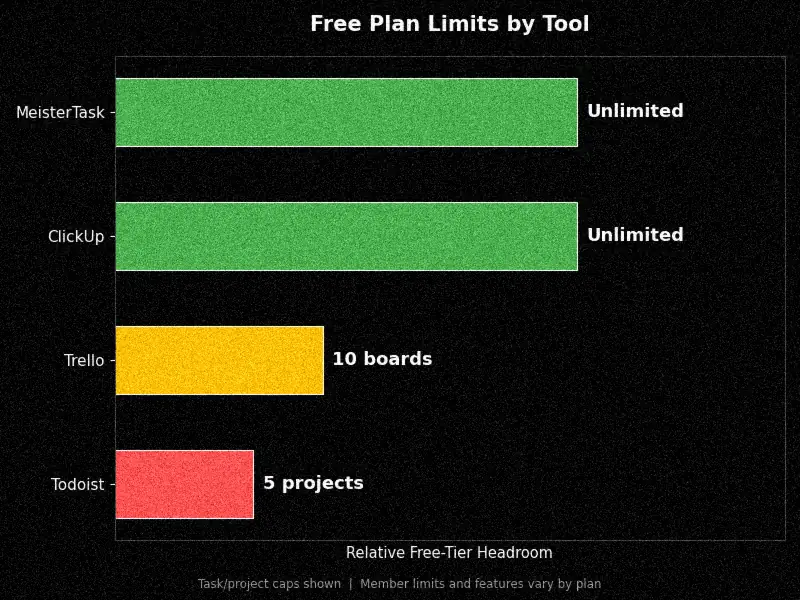
Yes, genuinely useful free task management tools exist, but almost every one caps you somewhere, usually on team size, task count, or automation. Knowing where that cap sits before you commit saves you a painful mid-project migration.
What “Free” Actually Includes
Free plans usually cap you on task count, board count, or team size rather than blocking core features outright. Here’s where each tool typically draws that line:
|
|
|
|---|---|---|
|
|
|
|
|
|
|
|
|
|
|
|
Top Free Picks for Small Teams
- MeisterTask stands out because it doesn’t cap task count or team members on the free plan, which is rare
- ClickUp gives generous free-tier features but the interface has a learning curve for very small teams
- Trello works well if your workflow is genuinely simple and doesn’t lean heavily on automation
- Now opens: “MeisterTask, ClickUp, and Trello offer the most usable free plans for small teams right now, each with a different tradeoff.”
Best Task Management Tools Online (No Install Needed)
Every tool on this list runs fully in the browser, so “online task management tools” really just means cloud-based, no desktop software required. This matters if your team works across different devices or doesn’t want IT managing installs.
Browser-based tools like Todoist, Trello, Asana, and ClickUp all sync in real time across web, mobile, and desktop apps, so switching from your laptop to your phone mid-task doesn’t lose any progress. If you want a deeper look at fitting these tools into an actual daily workflow, our guide on organizing tasks and workflow with task management software walks through the setup process in more detail.
Best Task Management Tools for ADHD
Task tools built for ADHD prioritize low-friction task entry and visual clarity over feature depth. The goal isn’t more features, it’s fewer steps between “I need to remember this” and “it’s written down.”
Why Standard Tools Often Don’t Work Well for ADHD
Most task apps are built around list-heavy interfaces with a lot of fields to fill in before a task even saves. That extra friction is exactly what causes tasks to never get entered in the first place, which defeats the entire purpose.
Features That Actually Help
- One-tap task capture – no forced categorization before you can save a task
- Visual boards over long lists – seeing work as cards reduces the feeling of an endless scroll
- Built-in reminders – nudges that don’t rely on you remembering to check the app
- Time-blocking views – seeing tasks against actual clock time, not just a due date
- Now opens: “The features that help most are the ones that remove steps, not add options.”
Top Picks for ADHD-Friendly Task Management
- Trello works well because the board format keeps everything visible without digging through menus
- Todoist has a genuinely fast quick-add feature that takes a task from your head to the app in seconds
- TickTick combines a task list with a built-in Pomodoro timer, useful for time-blindness
- Now opens: “Trello, Todoist, and TickTick consistently come up as the strongest picks…”
Best Open Source Task Management Tools
Open source task management tools give you full control over your data and hosting, which matters if you’re privacy-conscious or want to avoid vendor lock-in entirely. The tradeoff is you’re usually managing your own hosting and updates, not the vendor.
Why Teams Choose Open Source
- Full data ownership – nothing sits on a third-party server unless you choose that
- No forced pricing changes – you’re not stuck if a vendor raises prices overnight
- Deep customization – you can modify the tool’s actual code if you have the skills
- Now opens: Teams choose open source task tools mainly for control, over their data, their hosting, and their long-term costs.
Top Open-Source Picks
- Taiga is built for agile teams running scrum or kanban sprints
- OpenProject handles full project management, not just tasks, including Gantt charts
- Focalboard is a lightweight, self-hosted kanban tool that’s easy to get running quickly
- Now opens: Taiga, OpenProject, and Focalboard are the most actively maintained open-source options for small teams today.
How to Choose the Right Task Management Tool for Your Team
Pick based on your actual workflow complexity and budget, not the tool with the most reviews. A five-person content team and a twelve-person dev team need genuinely different things, even if they’re both “small teams.”
Team Size and Workflow Complexity
If your work is mostly independent tasks with light collaboration, a simple list tool like Todoist is plenty. If tasks depend on each other across departments, you need dependency tracking, which points you toward Wrike or Asana.
Budget and Free-Tier Limits
Map out what you’ll actually need in six months, not just today. A free plan that caps you at 10 boards feels fine now but becomes a real problem once you’re running multiple client projects at once, which is a mistake we’ve seen trip up growing teams more than once.
Integrations You Actually Use
Check that the tool connects to what your team already uses daily, whether that’s Slack, Google Drive, or your email client. A tool with 200 integrations you’ll never touch isn’t more useful than one with 15 that cover everything you actually need.
Common Mistakes Small Teams Make When Picking a Task Tool
- Choosing based on features, not workflow. A feature-packed tool nobody uses correctly is worse than a simple one everyone opens daily.
- Ignoring the free-tier cliff. Teams often pick a free plan without checking what happens once they hit the limit mid-project.
- Skipping the trial period. A quick two-week test with real tasks reveals more than any comparison article, including this one.
- Not assigning clear task owners. Even the best tool fails if tasks sit unassigned, since ownership is what actually drives things forward.
- Overcomplicating the setup. Building 15 custom fields before anyone’s used the tool once usually means it never gets adopted.
- Now opens: “Most task-tool failures come down to picking based on features instead of actual daily workflow.”
Juggling several overlapping projects at once brings its own set of challenges beyond just picking software. If that’s where your team is stuck, our piece on managing multiple tasks efficiently covers the workflow side of the problem, not just the tool side.
Frequently Asked Questions
What is the easiest task management tool for a small team to start with?
Todoist is usually the fastest to get a team running on, since task creation takes seconds and there’s almost no setup required. Trello is a close second if your team prefers a visual board over a list.
Do I need a paid plan, or is free enough for a small team?
Free plans work fine for teams under 10 people with straightforward workflows. Once you need automation, advanced reporting, or more than a few active projects, you’ll likely hit the free-tier ceiling.
What’s the difference between task management and project management software?
Task management focuses on individual to-dos, owners, and deadlines. Project management adds budgets, resource planning, and dependency tracking across a whole project, which most small teams don’t need until they scale up.
Are open source task management tools harder to set up than paid tools?
Generally yes, since you’re often responsible for hosting and updates yourself. If your team doesn’t have technical resources, a hosted free plan from a tool like ClickUp or Trello is usually a smoother starting point.
Can task management tools help teams that struggle with disorganization beyond just software?
Software helps, but it’s only part of the picture. If disorganization is a recurring issue tied to how work gets prioritized across the business, it’s worth looking at broader process gaps too, our guide on risk management tips for small and medium-sized businesses covers some of the operational side that task tools alone won’t fix.
Final Thoughts
The best task management tool for your team is the one that matches how your team actually works, not the one with the highest star rating. Start with a free plan, run it for two real weeks with actual tasks, and pay attention to whether people naturally open it or quietly go back to Slack messages and sticky notes.
At Apzo Media, the tools that stuck long-term were the ones nobody had to be reminded to use. That’s the real test, more than any feature comparison.