



In today’s digital world, understanding what people are searching for online is one of the most powerful advantages you can have. Whether you are a blogger, a business owner, a marketer, or a journalist, knowing what topics are trending can help you make smarter decisions and reach a wider audience.
That is exactly where Google Trends comes in. It is a free, easy-to-use tool from Google that shows you what the world is searching for — in real time and over historical periods.
In this complete guide, we will walk you through everything you need to know about Google Trends — from how it works to how you can use it effectively.
🔑 Key Takeaways
- Google Trends is a free tool by Google that tracks search interest over time.
- It shows relative popularity on a scale of 0 to 100 — not exact search volumes.
- You can filter results by country, time range, category, and search type.
- It is useful for SEO, content planning, market research, and news analysis.
- Google Trends data is available from the year 2004 to the present day.
What is Google Trends?
Google Trends is a free, publicly available web-based tool created by Google. It analyzes the popularity of search queries across Google Search, Google News, Google Images, Google Shopping, and YouTube.
Simply put, Google Trends tells you how popular a keyword or topic is at any given time — and how that popularity has changed over days, months, or even years.
Official Website: trends.google.com
A Brief History of Google Trends
Google Trends was officially launched in May 2006. Before this, Google published an annual report called “Google Zeitgeist” (started in 2001), which listed the most popular searches of the year. Over time, this evolved into the interactive, real-time tool we know today.
Today, Google Trends processes data from billions of daily searches and allows users to explore trends going all the way back to January 2004.
How Does Google Trends Work?
Google Trends does not show you the exact number of searches for a keyword. Instead, it displays relative popularity on a scale of 0 to 100, where the highest point represents peak popularity within the chosen time frame.
- 100 = Peak popularity of a search term during the selected period
- 50 = Half as popular compared to the peak
- 0 = Insufficient data (too few searches to display)
Important: Google Trends data is sampled and anonymized. It removes repeated searches from the same user over a short period and excludes very low-volume queries.
Key Features of Google Trends
1. Explore — Search Interest Over Time
The Explore section is the core feature of Google Trends. Enter any keyword or topic and you will see:
- A line graph showing how search interest has changed over time
- Interest broken down by region — country, state, or city level
- Related topics and related queries with rising or breakout tags
- The ability to compare up to 5 different keywords side by side
2. Filter Options
Google Trends offers powerful filters to refine your results:
| Filter | Options Available |
| Location | Worldwide, a specific country, or a specific region within a country |
| Time Range | Past hour, past day, past 7 days, 90 days, 12 months, 5 years, 2004–present, or custom range |
| Category | All categories or a specific one such as Health, Technology, Sports, Finance, etc. |
| Search Type | Web Search, Image Search, News Search, Google Shopping, or YouTube Search |
3. Trending Searches
This section shows what is trending right now in your selected country, updated in real time. It is especially valuable for news journalists, social media managers, and content creators who want to catch viral topics early — before the competition does.
4. Year in Search
Every December, Google releases its annual “Year in Search” — a curated summary of the most searched people, events, movies, songs, and topics from that year. It is a fascinating cultural snapshot of global curiosity.
How to Use Google Trends — Step by Step
Using Google Trends is straightforward. Follow these simple steps to get started:
- Step 1: Open your browser and go to trends.google.com
- Step 2: Type any keyword or topic in the search bar (for example: “AI tools”, “Budget 2025”, “electric cars”)
- Step 3: Press Enter to view the interest-over-time graph
- Step 4: Use the filter dropdowns to adjust location, time range, category, and search type
- Step 5: Scroll down to explore Interest by Region and Related Queries
- Step 6: Click the ‘+ Compare’ button to compare up to 5 keywords at the same time
- Step 7: Click the download icon to export data as a CSV file for further analysis
Top Use Cases of Google Trends
1. SEO and Keyword Research
Google Trends is one of the most underrated SEO tools available. Here is how SEO professionals use it:
- Identify rising keywords before they become highly competitive
- Compare two keywords to decide which one to target in your content
- Understand seasonal search patterns (e.g., ‘winter jackets’ spikes every October and November)
- Discover long-tail keyword ideas through the Related Queries section
- Validate your chosen topic before investing time in writing
2. Content Marketing and Blog Planning
Content creators and bloggers can use Google Trends to build a smarter editorial calendar. For example, if you write about fitness, data shows that searches for gym workouts spike every January — making it the ideal time to publish related articles. Planning content around these peaks can significantly improve your organic traffic.
3. Business and Market Research
Businesses of all sizes can leverage Google Trends for:
- Understanding consumer demand for products or services over time
- Tracking competitor brand popularity and comparing it to their own
- Identifying which cities or regions show the highest interest in their offering
- Planning advertising campaigns around peak demand windows
- Spotting emerging market opportunities before competitors do
4. Journalism and News Reporting
Journalists and news editors use Google Trends to validate story ideas, measure public interest in breaking news, and understand which angle of a story resonates most with readers. The real-time Trending Searches feature is especially valuable for news teams working on tight deadlines.
5. YouTube Content Strategy
By switching the search type to YouTube Search, you can discover trending topics specifically on YouTube — not just on the web. This helps video creators publish content that matches what viewers are actively searching for, leading to better visibility and more subscribers.
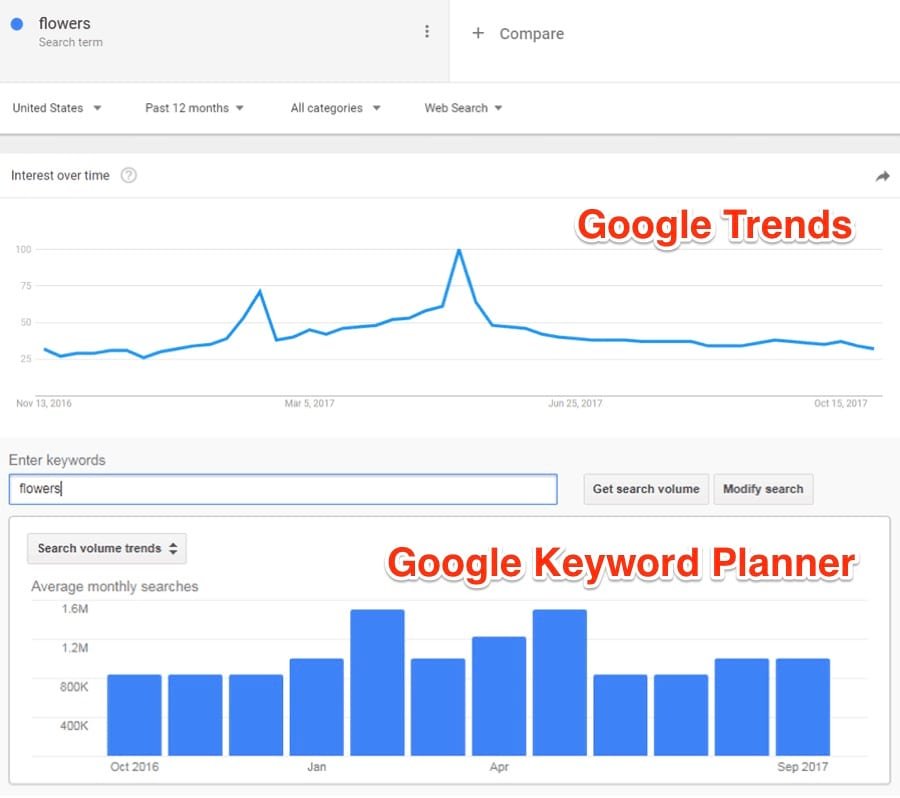
💡 Pro Tip: Use Google Trends alongside Google Keyword Planner for the most complete picture. Trends shows you the direction of a keyword, while Keyword Planner tells you the exact monthly search volume.
Google Trends: Pros and Cons
| ✅ Pros | ❌ Cons |
| 100% free to use | Shows relative, not absolute, search volumes |
| Real-time and historical trending data | Data is sampled and may not be 100% precise |
| Available in 230+ countries and regions | Very low-volume keywords may return 0 data |
| Historical data available from 2004 | No direct API access without technical setup |
| Supports YouTube, News, and Shopping filters | Limited granularity for highly niche topics |
Google Trends vs. Other Keyword Research Tools
Many people wonder how Google Trends compares to tools like SEMrush, Ahrefs, or Google Keyword Planner. Each tool serves a different purpose:
- Google Keyword Planner — Shows exact monthly search volumes. Best for paid advertising campaigns.
- SEMrush / Ahrefs — Show SEO difficulty, backlink profiles, and traffic estimates. Powerful but paid tools.
- Google Trends — Shows relative popularity and trend direction over time. 100% free and real-time.
Frequently Asked Questions (FAQs)
These are the most common questions people ask about Google Trends:
Q1. Is Google Trends free to use?
Yes, Google Trends is completely free. You do not need a Google account to browse basic trend data, but signing in allows you to save and revisit your searches.
Q2. Does Google Trends show the exact number of searches?
No. Google Trends shows relative interest on a scale of 0 to 100, not the actual number of monthly searches. For exact search volumes, use Google Keyword Planner.
Q3. How far back does Google Trends data go?
Google Trends provides data going back to January 2004, making it an excellent tool for analyzing long-term shifts in public interest.
Q4. Can I use Google Trends for YouTube?
Yes. In the Explore tab, switch the search type to ‘YouTube Search’ to see trending topics specifically on YouTube, separate from regular web search trends.
Q5. Is Google Trends data updated in real time?
The Trending Searches section is updated in real time. The Explore section also offers near-real-time views when you select ‘Past hour’ or ‘Past day’ as the time range.
Q6. Can I download Google Trends data?
Yes. On any Trends chart, click the download icon to export the data as a CSV file, which you can open in Excel or Google Sheets for deeper analysis.
Q7. Is Google Trends useful for small and local businesses?
Absolutely. You can set the location to a specific country, state, or city to see hyper-local search trends that are directly relevant to your business and target audience.
Q8. What does a ‘Breakout’ tag mean in Related Queries?
A ‘Breakout’ tag means the search term has grown by more than 5,000% in the selected time period. This usually signals a very new, fast-rising trend worth paying close attention to.
Conclusion
Google Trends is one of the most powerful yet underutilized free tools available on the internet. It gives you a direct window into what millions of people are searching for right now — and how those interests have shifted over time.
Whether your goal is to find trending keywords, track your brand’s online reputation, plan your content calendar, or understand consumer behavior in a specific region — Google Trends has the data to help you succeed.
👉 Start exploring for free today at trends.google.com — the insights are just a search away.